

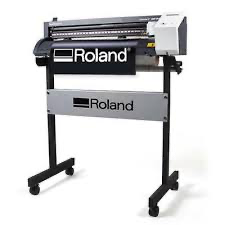
Roland GS-24 Vinyl Cutter
If the vinyl cutter is not in the Fab Lab, look for it in the Bernina room.
- Use it to cut rolls of material like vinyl, copper tape, twill, heat transfers, etc.
- Great alternative for vinyl, which would release toxic fumes if cut in the laser cutter
- Also a good alternative to avoid charred edges from laser cutting other materials like thin cardboard
- Overlap cutting (up to 10x), for cutting thicker media like magnetic materials and card stock
- Cutting speed up to 50 cm per second
Setup Instructions:
Install Software "Roland CutStudio" and Driver
Download and install "CAMM-1 Driver" and "Roland CutStudio" for your OS from https://downloadcenter.rolanddg.com/GS-24
There is also a plugin for Adobe Illustrator as an alternative for Roland CutStudio.
Cutting:
Follow steps on Roland Website: https://downloadcenter.rolanddg.com/contents/manuals/GS-24_Win_Manual_EN/GS-24_USE_EN_04.html under "Simple! Basic Cutting"
In case your imported image is not recognized correctly try: "Right-click -> Image Outline -> Extract Contour Lines"
Link to manual: https://downloadcenter.rolanddg.com/GS-24
Material List: https://hci.rwth-aachen.de/vinylcutter-materials