

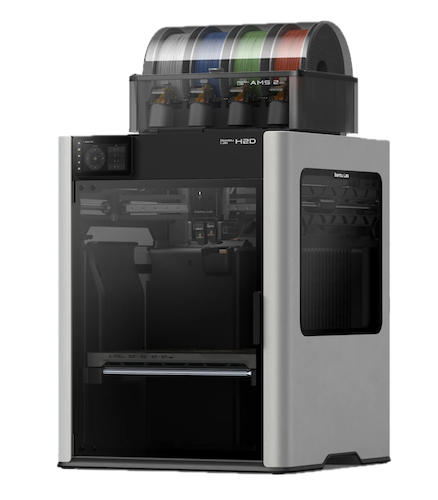
Bambulab H2D
Machine status: Ready to use
Check out this page for general information on 3D printing with our printers.
Our Bambulab H2D is an all-in-one, dual-nozzle FDM 3D printer designed for high-speed, multi-material fabrication. It features a fully enclosed build chamber with active heating up to 65 °C and hotends capable of 350 °C, ensuring minimal warping and excellent layer adhesion even with advanced engineering filaments. It has a generous 350 × 320 × 325 mm build volume and two separate nozzles.
This printer joined our lab in April 2025, expanding our capacity for larger and more intricate projects.
This printer supports all the filaments we have. Note that very soft TPU (everything not explicitly labeled as “TPU for AMS”) must be loaded externally and manually.
AMS (Automated Material System)
The H2D is equipped with three AMS—one for the left and two for the right each nozzle—allowing fully dynamic filament allocation per job. Instead of pre-loading fixed colors, the printer will recommend the optimal assignment of up to two spools based on your multi-color or multi-material print. Filaments are swapped seamlessly during printing to minimize purge waste and maximize efficiency.
AMS C of this printer is reserved for Nylon & PC filament. It is important to keep this AMS closed since Nylon has to be incredibly dry for printing. We therefore sometimes use the heating feature of the AMS to dry the filament. So don't be surprised when it is hot.
Feel free to experiment with combinations: reserve one hopper for support material, or load two contrasting colors for intricate color-change effects. The H2D’s smart algorithms will handle the rest, ensuring smooth, uninterrupted production.
Printing with TPU
If you want to use very soft TPU that is not made for AMS use, consider using the A1Mini. If you need the bigger print volume or multi-material prints, you can also use the H2D for it. Loading
Changing Nozzles
We have 0.2mm and 0.4mm nozzles for the H2D. Right now, the H2D always needs the same size installed on both sides. The pair that is not in use is stored in a small holder on the side of the printer. 0.4mm is the standard; only switch to 0.2 if really needed for smaller details.
For swapping the nozzles, you can follow this guide we found online. Please make sure the printer is cold. You can check this on the screen of the printer under the second icon on the right, then "Nozzle and Extruder".
Modifications
We have added a PTFE tube to the right side of the printer, if you have filament that can't go into the AMS (e.g. the conductive PLA). Please note, that TPU still requires a special process, as described below.