
2nd multi-touch workshop '08 in Hagenberg
Demos
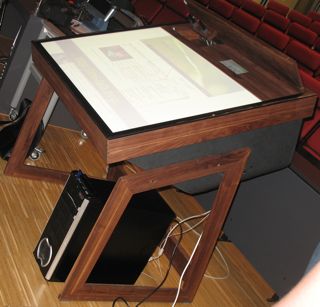
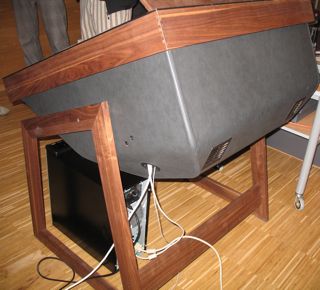
These are pictures of the combined multi-touch/Anoto table the guys at Media Interaction Group in Hagenberg built for themselves. Inside is a Toshiba short-throw projector and PointGreyResearch Firefly2 combined with pen interaction via Anoto pen and pattern on the display. You can turn the display around and use it like shown in the picture to sit before it, or turn it horizontally and stand around it with other people, or turn it vertically and use it as a whiteboard.
More Anoto stuff
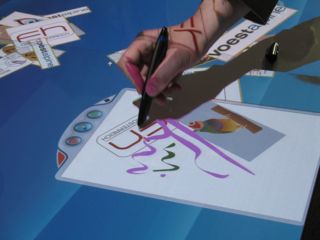
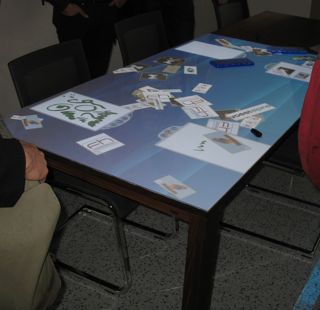
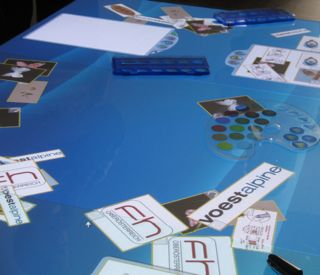 This is a top-projected table with Anoto pattern printed on the paper underlying the glass plate. Users can write, or paint on the virtual paper, change colors with real color palettes (also via Anoto pattern). Furthermore they can cut & paste by "sucking" content into the pen and "spill it out" at some other place, or send content to a nearby electronic whiteboard which is also an Anoto pattern printed. They used a small-scale version for their presentation to show how to make annotations on the slides.
{FLASH(movie=http://www.youtube.com/v/VBo13cCqnM4,
width=>425,height=>350,quality=>high)/}
Comino
 Combined virtual and physical domino game for pen-based tabletop. Uses (among other things) Arduino boards. For more info have a look here.
{FLASH(movie=http://www.youtube.com/v/CDGem374Z28,
width=>425,height=>350,quality=>high)/}
And another video about increTable where a depth camera and an additional top-down projector were added.
{FLASH(movie=http://www.youtube.com/v/eyON6SJpVus,
width=>425,height=>350,quality=>high)/}
Same table with another game.
{FLASH(movie=http://www.youtube.com/v/r3V1Yx5ooyk,
width=>425,height=>350,quality=>high)/}
Arena 3-D
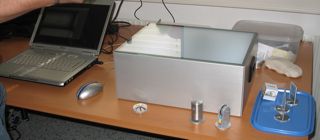
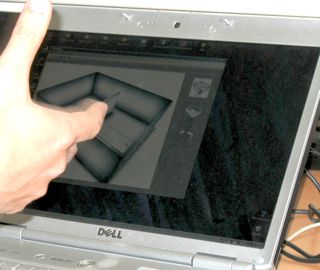
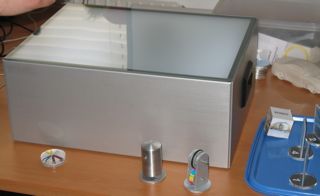 With this system the user can navigate through a 3-D model shown on the PC by moving items around on the glass plate. The plate represents the site of the model (without projecting). There are different items which can be used to add content to the virtual room like presentations or pictures. They are distinguished by markers at the bottom which can be changed by rotating/pushing/turning them. The box only contains a light source (uses visible light) and a camera, similar to the DI technique used e.g. for the reacTable. More info here.
Diamond Touch
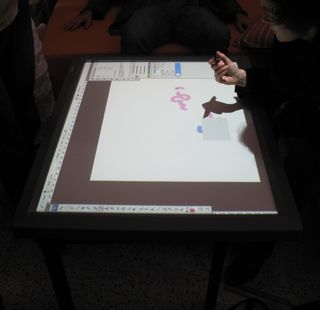 They had also a DiamondTouch table for which someone wrote a Photoshop plugin.
Presentations
- Remote Tabletop Collaboration (Francois Coldefy)
- possible applications: brainstorming sessions, maritime control, remote collaboration
- system is supposed to allow users to see who does what with which intention
- additional camera to allow eye-to-eye contact
- remote gesture visualization
- Anoto Technoloy - capabilities and limitations (Petter Erickson)
- Anoto pattern quite large -> covers several square km
- can be printed on every surface you can print on
- highly accurate
- latency about 80ms
- upcoming hardware can detect pen orientation and angle (similar to Wacom)
- Large Interactive Displays & Pen-based Interfaces (Felix Flentge/Erwin Aitenbichler/Jürgen Steimle)
- pen and paper interfaces
- goal: augment existing techniques
- coScribe: add annotations with pen on lecture slides (printout) with Anoto pattern, review it later & share and compare with notes made by others
- digital paper bookmarks
- multi-touch prototype
- uses only ambient IR-light (works best with sun shining (:cool:) ) -> black dots for fingers while screen is white
- Multitouch- & Pen-based Interfaces (PeterBrandl)
- uses Anoto pen & pattern in realtime or offline mode
- digital whiteboard & paper (printout)
- pen detects where it is used and sends commands or notes to the whiteboard
- printout is divided into content and control area
- different pattern on each sheet of paper
- same pattern for each control area -> remote control over whiteboard content by using the paper printout
- pie-menu for changing whiteboard content or parameters (zoom, move, rotate...)
-
- FLUX (Jakob Leitner)
- see pics at the top
- combined Anoto tabletop and FTIR multi-touch
- part of "Office of Tomorrow" project @ [|Media Interaction Lab
- A FTIR based multi-touch table using pulsed illumination for noise suppression (Uwe Hahne)
- increase emitted light from LEDs by pulsing them
- 20kHz
- synced by 60fps camera
- BUT halved by flipflop to 30fps for continuously updated background pictures to adopt to changing light conditions
- tests showed good performance
- get their schematics here
You can get the "Proceedings", i.e. all the slides, here, and a full resolution version of the pictures here.