
Design principles
We applied the design principles that can be used within our device. so that
it provides the simplicity and the ease of use. Many design principles were
taking in consideration while designing it ,as:
Norman's principles:
The figure below tries to give a small example of how we used Norman's principles in our design.
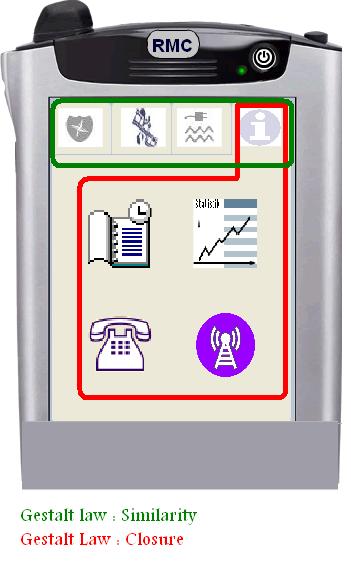
Gestalt laws :
The figure below tries to give a small example of how we used Gestalt laws in our design.
Golden rules :
1. Keep the interface simple!
As the first and most important rule, we follow it from beginning of our design.
From beginning, we list many features in our RMC device. After paper prototyping,
we found, that our user does not need some of them.
Like “monitor”, we think it should be an exciting feature in our
design. But after paper prototype, user told us it is hardly used. To avoid
“creeping featurisms”, we concentrate on 5 most common features
to develop.
2. Speak the user’s language!
Considering our users are who really has no time to arrange his daily life, we keep the languages simplified. In most cases, we use Graphic User Interface to explain the interaction, instead of texture “Help” of “Wizard”.
3. Be consistent and predictable!
We use 4 tags for 4 aspects of our design. In each of them, consistent buttons and layout are defined.
4. Provide feedback!
We provide feedback in password frame, the sounds between correct and false
password are different. User knows his false password immediately.
Furthermore, the locks on the windows and doors can be changed. After user clicks
the lock with state “locked”, it will turn to “unlock”.
That indicates users the statement is different now.
Add light on icons to show which one is selected.
5. Minimize memory load!
In „ house “option, we use natural mapping of the house to show
the distribution of windows and doors in the real world. That is the knowledge
in the world, user don’t have to remember the sequence number of their
windows. Instead, they can recognize their houses easily by the maps.
In order to access different tags or windows, we throw the idea of using path.
In our design icons or options are easily accessible. Users don’t need
remember the exactly steps to access a new function.
6. Avoid errors, help to recover, offer Undo!
7. Design clear exits and closed dialogs!
8. Include help and documentation!
9. Offer shortcuts for experts!